Why am I having trouble programming my Powerbolt 250?
Having trouble programming your Powerbolt 250 or noticing that the keypad stops responding to your code?
If you’re unable to program the Powerbolt 250, notice flashing lights or hear beeps during programming, or if the latch bolt isn’t moving, the interior turn‑piece is hard to turn, or the lock only works when a key is inserted, the issue may be related to installation.
Follow the steps below to help resolve it:
- Open the door and rotate the latch to either the locked or unlocked position, whichever is easiest to turn to, based on the lock’s tension.
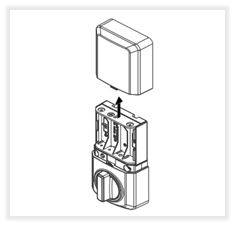
- After locking or unlocking, Remove the Keys from the key cylinder and slide the interior cover off.
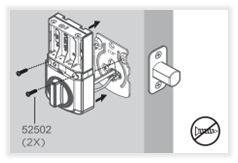
- Unscrew and unmount the interior assembly of the lock.
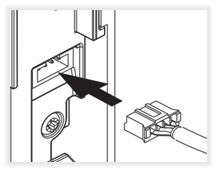
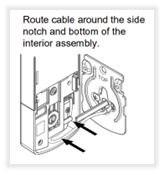
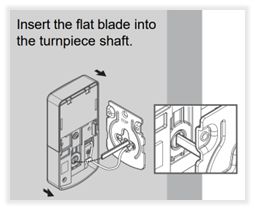
- Ensure the cable is securely plugged in and tucked in clear from the flat blade.
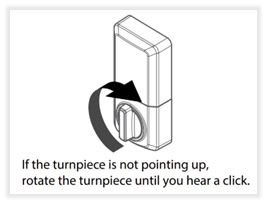
- Rotate the turn-piece before installing it on the door to ensure it’s oriented in the correct direction to match the flat blade.
- Insert flat blade into turn piece shaft. If the latch bolt is LOCKED, turn piece should be VERTICAL. If latch bolt is UNLOCKED, turn piece should be HORIZONTAL.
- Ensure to use the correct screws when reinstalling the interior assembly. Using the pointed screws will damage the product.
- After mounting the interior assembly, ensure that fresh batteries are fully installed in the correct orientation. Complete the Door Rehanding Process so the lock can learn the correct locking and unlocking direction for your door:
Note: Please check your door’s alignment and the jamb hole depth to prevent any jamming errors: https://www.kwikset.com/support/answers/how-do-i-check-door-alignment-for-my-smart-lock
-
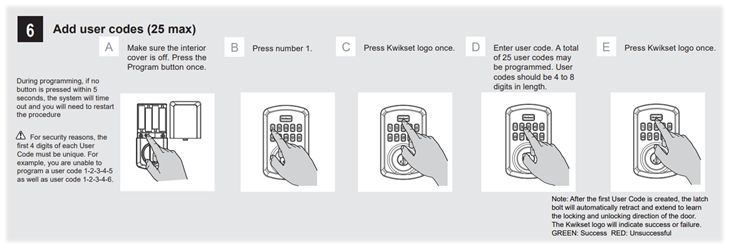
Program the User Code: Make sure the interior cover is off. Press the Program button once. Press number 1 button once, press the Kwikset logo button once, enter your User Code of choice (A total of 25 user codes may be programmed. User Codes should be 4 to 8 digits in length.) Press the Kwikset logo button once. Reference Step 6 in Installation and User Guide:
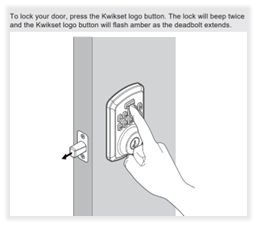
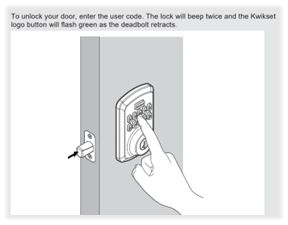
- Test the User Code while the door is open. To lock the deadbolt, press the “Kwikset” button at the top of the keypad and to unlock the deadbolt, enter your User Code.
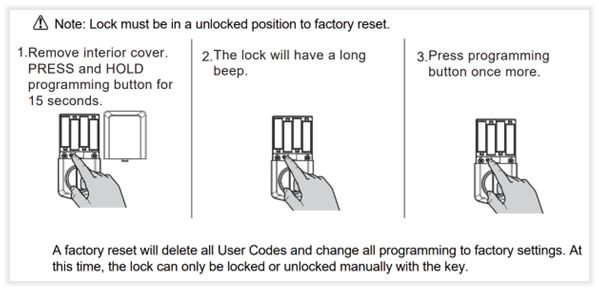
- If you are still unable to program your lock, you may need to reset it and start fresh. Follow the Factory Reset steps with the door open and unlocked.
- Complete steps 8, 9, and 10 after the Factory Reset.
- Reference pages 3 and 4 of the Installation and User Guide for additional programming features.
Powerbolt 250 Installation and User Guide: Installation instructions.